Running Amazon Ads can feel exciting at first. You launch campaigns, you start getting impressions, maybe even sales — and then the dashboard starts throwing numbers at you.
ACoS. CTR. CPC. TACoS. Placement modifiers.
And suddenly you’re not sure what actually matters.
If you’ve ever looked at your ad dashboard and thought:
“Am I making money… or just spending it?”
You’re not alone.
Monitoring Amazon Ads isn’t about staring at numbers every day. It’s about understanding what those numbers are telling you — and knowing what to do next.
Let’s simplify it.
Why Monitoring Your Amazon Ads Really Matters?
Amazon Ads change constantly.
- Competitors increase bids.
- New sellers enter your niche.
- CPCs fluctuate.
- Seasonality shifts buying behavior.
If you’re not monitoring your campaigns, small issues can quietly eat into your profit margins.
Here’s what proper monitoring helps you do:
- Catch wasted spend early
- Scale what’s working
- Protect your profit margins
- Improve your organic ranking
- Make decisions based on data, not emotion
Ads shouldn’t feel like gambling. They should feel controlled.
Amazon’s own Advertising Console gives you access to rich metrics and reports.
Beyond that, analytics and third-party tools deepen insight.
Process to Monitor Amazon Ads Progress
Step 1: Establish Your Baseline & Goals
Before diving into reports, set a benchmark and define what “good performance” means for your product and margin.
- Pull your recent campaign data over the last 30 days (or your launch period).
- Note your ACoS, Total Spend, Ad Sales, Impressions, Clicks, and Conversion Rate.
- Define acceptable ranges: e.g. target ACoS < X%, desired CTR, or ROAS threshold.
- Segment goals by campaign type (Sponsored Products, Sponsored Brands, Display).
Now calculate your break-even ACoS.
If your product margin is 30%, your break-even ACoS is 30%.
That means:
- Above 30% → you’re losing money.
- Below 30% → you’re profitable (before overhead).
Without this number, optimization becomes emotional instead of strategic.
With this baseline in hand, you’ll more clearly see when a metric is “off” — and by how much.
Step 2: Know the Key Metrics You Must Watch
Monitoring works only if you focus on the right signal metrics. Here are the core ones (and what each tells you):
Tip: Don’t overcomplicate early. Start with Impressions → CTR → CPC → CVR → ACoS flow. Once that’s stable, layer in TACoS, placement shares, etc.
Step 3: Use the Right Reports & Tools
Amazon offers built-in reports — and third-party tools can help you slice & dice data faster.
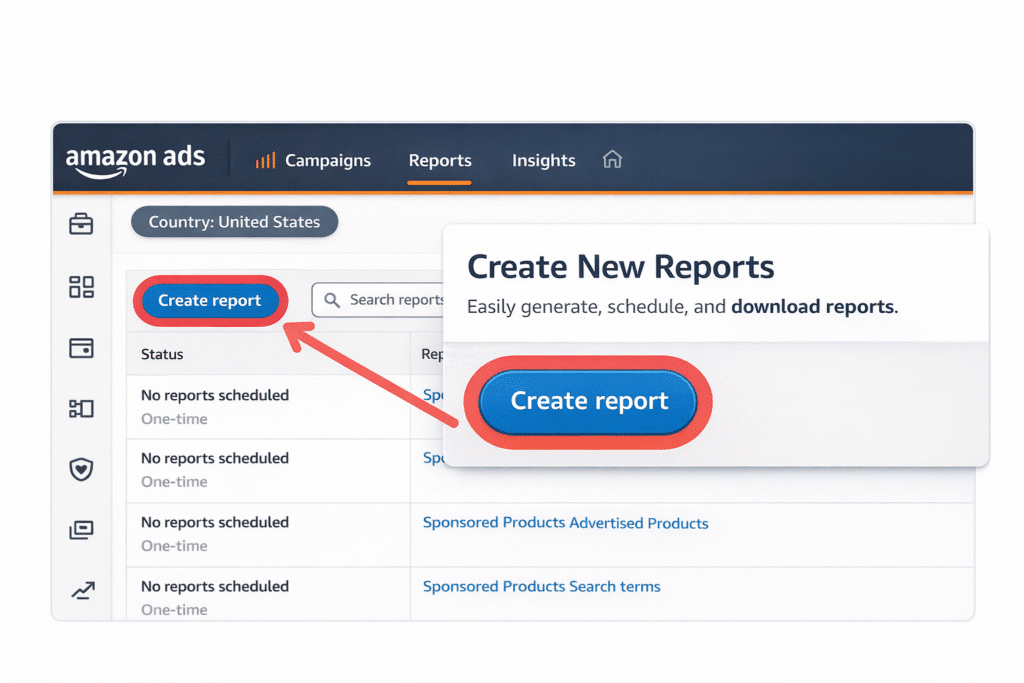
Amazon’s Tools & Reports
- Advertising Console Dashboard & Columns — choose which metrics to display, filter by date range, campaign type
- Search Term / Search Query Report — see exactly what users typed that triggered your ads. Great for negative keyword discovery.
- Campaign Performance Report — overview of spend, sales, ACoS by campaign
- Placement Report — shows performance by ad placement (top of search, product pages).
- Advertising API / Amazon Marketing Stream — for advanced monitoring, real-time metrics via API.
Third-Party & Analytics Tools
- Tools like Helium 10, Sellics, Scale Insights, PPC Assist, etc., provide dashboards, alerts, automated rules.
- Use these for deeper trend analysis, multi-campaign comparisons, and anomaly detection.
Step 4: Monitor Cadence & Frequency
How often you check depends on campaign maturity and budget:
- Daily — During launch or when scaling fast. Watch for sudden spikes or drops (e.g. impression dip, ACoS surge).
- Weekly — Normal optimization cadence. Evaluate trending metrics, spotting low performers.
- Monthly / Quarterly — Big-picture review: seasonality, TACoS, campaign restructuring, budget reallocation.
Always look at relative change (week-to-week, month-to-month), not just absolute numbers.
Step 5: Diagnose & Act Based on Metric Signals
When a metric behaves “badly,” it’s your cue to dig. Here’s a guide to common scenario diagnosis:
| Change / Red Flag | Possible Cause | Action to Take |
| Impressions ↓ | Bid too low, keyword relevance dropped, budget limited | Raise bid, add high-volume keywords, remove suppressed keywords |
| CTR low (< benchmark) | Ad not compelling, mismatched targeting, bad creatives | Test new images, revise title/copy, refine keyword targeting |
| CPC too high | Overbidding or high competition | Lower bid, shift toward long-tail, refine keyword list |
| CVR ↓ | Listing mismatch, pricing issue, negative reviews | Optimize listing (images, copy), test pricing, address poor reviews |
| ACoS rising | Conversion falling, CPC rising, wasted spend | Pause poor keywords, lower bids, shift budget to top performers |
| TACoS rising while ACoS dropping | You’re overly reliant on ads; organic sales lagging | Improve organic SEO, expand keywords to reduce ad dependency |
| Weak placement performance | Your ad is rarely showing in top slots | Increase bid or optimize ad content to win better placements |
Don’t make sweeping changes all at once. Change one variable (bid, keyword, creative) and monitor its effect over the next cycle.
Step 6: Advanced Monitoring & Attribution
(When You’re Ready to Think Beyond ACoS)
As your campaigns scale, simple surface-level metrics don’t always tell the full story.
ACoS might look high — but what if those ads are driving organic ranking?
One campaign may not convert directly — but what if it assists conversions later?
This is where advanced monitoring comes in.
It helps you understand the true impact of your advertising — not just the last click.
Multi-Touch Attribution (MTA)
Most sellers evaluate performance using last-click attribution.
Meaning:
The final ad clicked before purchase gets all the credit.
But that’s rarely how customers behave.
A typical buyer journey might look like this:
- Sees a Sponsored Brand ad
- Clicks but doesn’t purchase
- Sees a Sponsored Display retargeting ad
- Searches organically later
- Buys
If you only measure last-click data, you might pause the Sponsored Brand campaign — even though it introduced the customer to your product.
Multi-Touch Attribution (MTA) helps allocate credit across multiple ad touchpoints.
This gives you insight into:
- Which campaigns assist conversions
- Which ads create awareness
- Which placements introduce new customers
- How upper-funnel ads support lower-funnel performance
For scaling brands, this is critical.
You stop judging campaigns in isolation — and start evaluating them as part of a system.
Brand Lift & Awareness Measurement
Not every ad is meant to convert immediately.
Some ads exist to:
- Increase awareness
- Build brand recognition
- Improve purchase intent
Amazon Brand Lift studies measure:
- Ad recall
- Brand awareness
- Purchase consideration
- Brand favorability
If you’re investing in Sponsored Brands, video ads, or DSP, this data helps you understand whether your campaigns are influencing perception — even if conversion happens later.
For brands focused on long-term positioning, this matters.
Offline Attribution (For Brands Driving External Traffic)
If you’re running:
- Influencer campaigns
- Google Ads
- Email marketing
- Social media ads
Amazon Attribution allows you to track how external traffic converts on Amazon.
This helps answer:
- Are my Facebook ads driving Amazon sales?
- Is influencer traffic profitable?
- Which external channels generate higher ROAS?
Without attribution tracking, you’re guessing.
With it, you can confidently allocate budget to what truly performs.
Amazon Marketing Cloud (AMC) & Advanced Analytics
For larger or scaling brands, Amazon Marketing Cloud (AMC) unlocks deeper insights.
It allows custom queries across:
- Campaign types
- Audience segments
- Ad placements
- Purchase timelines
With AMC, you can analyze things like:
- Time-to-purchase after first ad exposure
- Overlap between Sponsored Products and Sponsored Brands
- Repeat purchase behavior
- New-to-brand customer acquisition
This moves you from tactical optimization to strategic planning.
Instead of asking:
“Did this keyword convert?”
You start asking:
“How does this campaign influence lifetime value?”
Why This Matters for Scaling Brands?
When you rely only on ACoS, you optimize for short-term efficiency.
When you layer in attribution, you optimize for long-term growth.
Advanced monitoring helps you:
- Identify incremental revenue
- Measure organic lift impact
- Understand full-funnel contribution
- Allocate budget strategically
- Scale without increasing dependency on ads
The goal isn’t just lowering ACoS.
The goal is understanding how ads fuel your entire Amazon ecosystem.
When Should You Move Into Advanced Monitoring?
You’re ready for deeper attribution if:
- You’re spending consistently at scale
- You’re running multiple campaign types
- You’re investing in external traffic
- You’re launching brand-focused ads
- You want to improve lifetime value, not just immediate ROAS
At this stage, simple dashboard checks aren’t enough.
You need structured analytics.
Example Walkthrough: Monitoring a Campaign
Let’s say you run a Sponsored Products campaign for a kitchen gadget.
- Baseline:
- Impressions: 100,000
- Clicks: 2,000 → CTR = 2%
- Ad Spend: $500
- Ad Sales: $2,500 → CVR = 5%
- ACoS = 500 / 2,500 = 20%
- Impressions: 100,000
- After 1 week: ACoS jumps to 30%, CPC increased, CVR dipped
- Diagnose: maybe new irrelevant keywords, or competition bid up CPC
- Action: review search term report, add negative keywords, reduce bids on low-performance ones
- Diagnose: maybe new irrelevant keywords, or competition bid up CPC
- Next day: CTR drops significantly
- Diagnose: ad fatigue or creative less effective
- Action: refresh images or tweak title
- Diagnose: ad fatigue or creative less effective
- Over month: TACoS creeping upward even though ACoS is stable
- Diagnose: organic sales stuck, ads carrying too much load
- Action: invest in SEO, expand organic reach, reduce ad dependency
- Diagnose: organic sales stuck, ads carrying too much load
By monitoring and responding in real time, you preserve budget and continuously improve.
Common Mistakes in Monitoring Amazon Ads
- Checking metrics without context — a number is meaningless without comparing trends or benchmarks.
- Changing too many things at once — you lose clarity on what moved the needle.
- Focusing only on ACoS — ignoring CTR, CVR, TACoS, or placement can lead to unbalanced decisions.
- Letting campaigns run unchecked for weeks — small issues can compound into big losses.
- Not using negative keywords — they’re powerful for eliminating wasteful spend.
- Over-optimizing early — give campaigns enough time to gather data before making radical tweaks.
Final Thoughts
Monitoring Amazon Ads isn’t passive — it’s a strategic discipline.
When you treat your campaigns like investments that need regular care, you protect your margins, accelerate growth, and stay competitive.
Start with tracking core metrics, build diagnostic habits, layer in advanced attribution, and always let data guide your next move. If you need help in setting up the ads campaign, analyzing results or optimizing them, Amerify‘s expert team can help you.