Want to know how to become an Amazon Vine? The answer depends on your role. Individuals can only join as reviewers by invitation from Amazon — there is no public application.
Sellers, however, can enroll eligible products directly through Seller Central if they meet specific requirements.
This guide explains both paths clearly and then shows sellers how to use Amazon Vine strategically to support a successful product launch.
How to Become an Amazon Vine Reviewer (Vine Voice)?
Amazon Vine is a product review program operated by Amazon that gives selected reviewers early access to new products in exchange for detailed, unbiased feedback. The reviewers inside this program are known as Vine Voices.
Many people searching “how to become an Amazon Vine” are actually trying to figure out how to join this reviewer program — so let’s clarify exactly how it works.
Can You Apply to Become a Vine Reviewer?
No — there is no public application process.
Amazon does not provide a sign-up form, registration link, or request portal for individuals who want to join Vine. Instead, membership is strictly invitation-only.
If you’re hoping to become a Vine Voice, you cannot directly apply. The only way to enter the program is to be selected by Amazon based on your past activity as a customer and reviewer.
That means the strategy is indirect: you earn consideration by building a strong review profile over time.
What Is a Vine Voice?
A Vine Voice is a highly trusted Amazon reviewer who has demonstrated consistent, high-quality contributions to the platform.
When browsing product listings, you may have seen reviews labeled with a small badge that says “Vine Customer Review of Free Product.” That badge indicates the review was written by a Vine Voice who received the item at no cost in exchange for honest feedback.
These reviewers are not paid for their opinions. Their credibility is built on:
- Thoughtful, well-structured reviews
- Clear pros and cons
- Honest evaluation
- Strong review history
- High helpful-vote engagement
The program is designed to improve trust in new or low-review products by generating detailed early feedback.
How Does Amazon Choose Vine Voices?
Amazon does not publicly disclose its full selection algorithm, but based on industry patterns and program observations, invitations are generally extended to customers who demonstrate:
1. Consistently Helpful Reviews
Reviews that other shoppers mark as “helpful” signal trustworthiness and insight.
2. Detailed Product Analysis
Short, vague comments rarely qualify. Strong candidates typically write:
- Structured reviews
- Comparative analysis
- Usage scenarios
- Quality assessments
3. Balanced and Unbiased Tone
Extremely positive or extremely negative reviewing patterns may reduce credibility. Balanced feedback tends to perform better.
4. Active Reviewing History
Accounts that regularly post reviews across categories appear more likely to gain visibility.
5. Good Account Standing
Amazon evaluates overall account compliance and behavior. Any policy violations can disqualify a user from consideration.
In short, Amazon monitors reviewer activity internally and invites a small percentage of high-quality contributors to join the program.
What Do Vine Reviewers Receive?
Vine Voices receive access to a private dashboard where they can request eligible products that sellers have enrolled in the program.
Here’s what they get:
- Free products (shipped through FBA)
- No monetary compensation
- Access to new product launches
- Early testing opportunities
In exchange, they are required to:
- Submit honest reviews
- Follow Amazon’s community guidelines
- Avoid conflicts of interest
Their reviews are clearly labeled to maintain transparency.
Are Vine Reviews Guaranteed to Be Positive?
No.
This is one of the most misunderstood aspects of Amazon Vine.
Sellers cannot influence Vine reviewers. They:
- Cannot contact them
- Cannot request rating changes
- Cannot offer incentives
- Cannot remove negative Vine reviews
If a product has flaws, Vine reviewers will mention them.
That’s why sellers are strongly advised to ensure product quality and listing accuracy before enrolling in the program.
How Long Does It Take to Become a Vine Voice?
There is no fixed timeline.
Some users report receiving invitations after years of reviewing. Others may receive one unexpectedly without heavy activity.
Because Amazon does not publish benchmarks, the only reliable approach is:
- Write consistently helpful reviews
- Provide detailed feedback
- Maintain strong account standing
- Avoid policy violations
There is no shortcut, automation strategy, or guaranteed pathway.
Is It Worth Trying to Become a Vine Reviewer?
For individuals who enjoy testing products and writing reviews, the program can be appealing. However, it’s important to understand:
- Product availability varies by category
- There is no guarantee of high-value items
- Reviews require effort and accountability
- Selection is not predictable
For most entrepreneurs, business owners, and brand builders, the seller side of Amazon Vine is far more impactful strategically.
And that’s where the real leverage exists.
How to Become an Amazon Vine as a Seller?
For Amazon sellers, Vine is not about receiving free products — it’s about accelerating trust.
When launching a new ASIN, the biggest barrier to conversion is the absence of reviews. Even strong listings struggle to convert traffic without social proof.
Amazon Vine is specifically designed to solve that early-stage credibility gap by helping eligible sellers generate initial reviews through vetted reviewers.
Unlike the reviewer side (which is invitation-only), sellers can proactively enroll products — provided they meet strict eligibility criteria.
Who Is Eligible to Enroll in Amazon Vine?
Before attempting enrollment, confirm you meet all requirements:
1. Professional Seller Account: Individual plans are not eligible.
2. Brand Registry Enrollment: Your brand must be enrolled in Amazon Brand Registry.
3. FBA Fulfillment: Only Fulfillment by Amazon (FBA) listings qualify.
4. Fewer Than 30 Reviews: Vine is designed for new or low-review ASINs.
5. Complete Product Listing
Your listing must include:
- Title
- Bullet points
- Product description
- Images
If any requirement is missing, your ASIN will not appear in the Vine dashboard.
Step-by-Step: How to Enroll a Product in Amazon Vine?
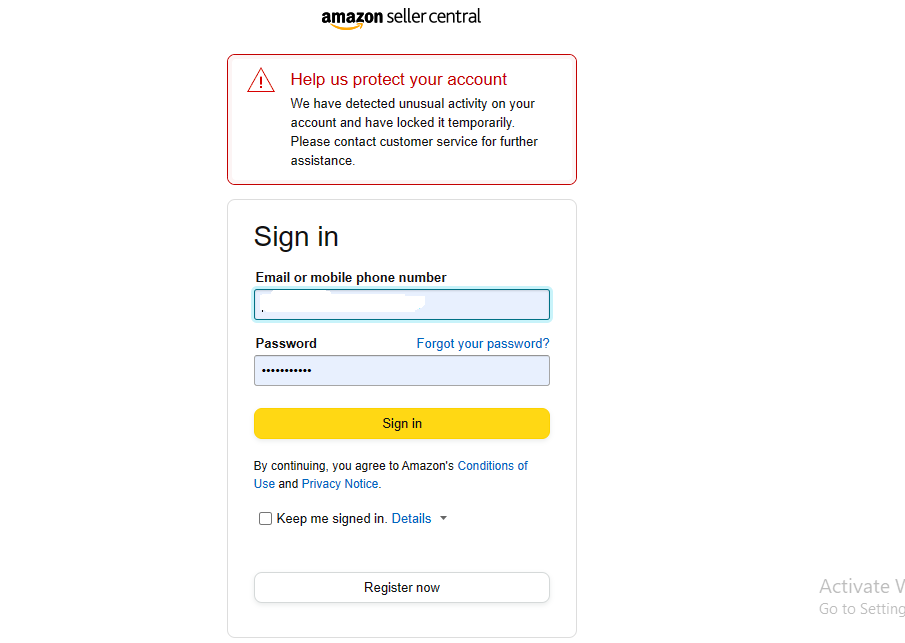
Step 1: Log in to Amazon Seller Central
What to Do?
- Go to sellercentral.amazon.com
- Enter your email and password
- Complete 2-step verification (if enabled)
- Wait until your Seller Central dashboard fully loads
You should now see the main navigation bar at the top of the screen, including:
- Catalog
- Inventory
- Advertising
- Reports
- Performance
If you do not see the full navigation bar, your user permissions may be restricted. In that case, contact your account administrator to grant access to the Advertising programs.
Step 2: Navigate to the Amazon Vine Dashboard
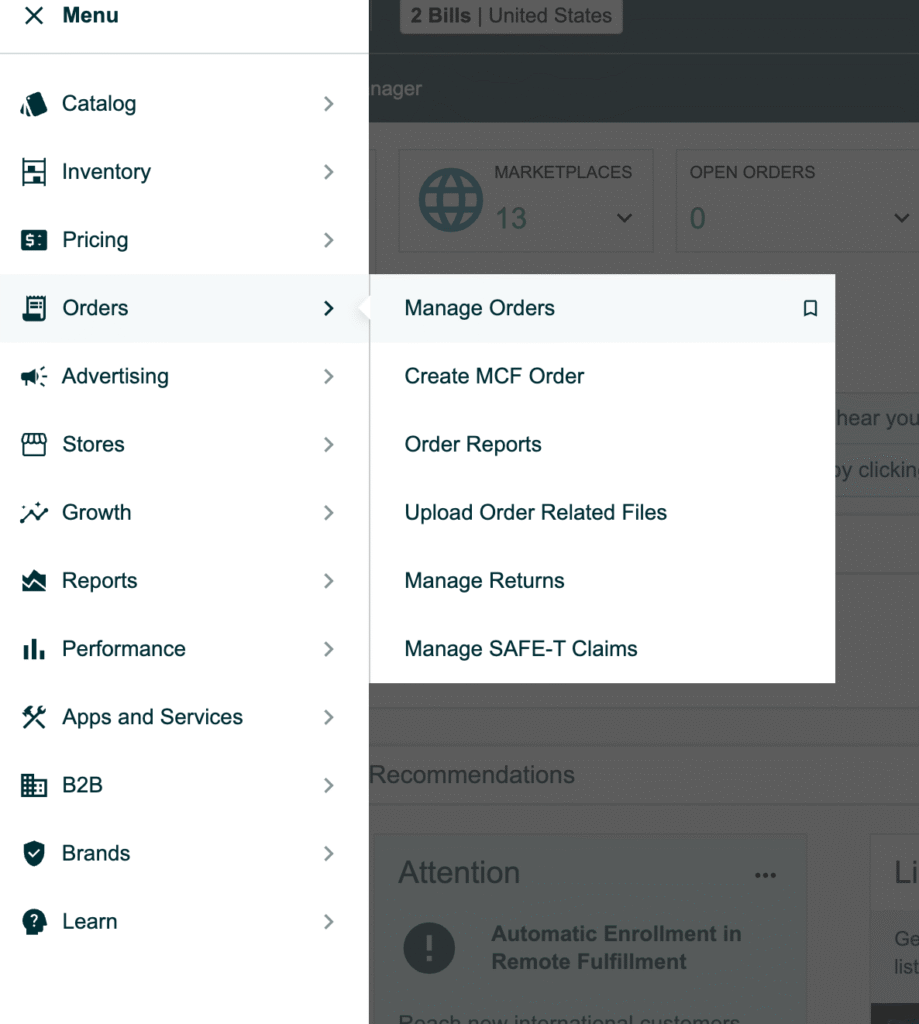
What to Do?
- Hover your mouse over the Advertising tab in the top navigation bar.
- In the dropdown menu, click Vine.
You will be redirected to the Amazon Vine dashboard.
On this page, you should see:
- A summary of the Vine program
- A section labeled “Enroll ASINs.”
- A list of eligible products
If you do not see the Vine option under Advertising:
- Confirm Brand Registry status
- Confirm you are on a Professional plan
- Confirm your user role includes Advertising permissions
Step 3: Check Eligible ASINs
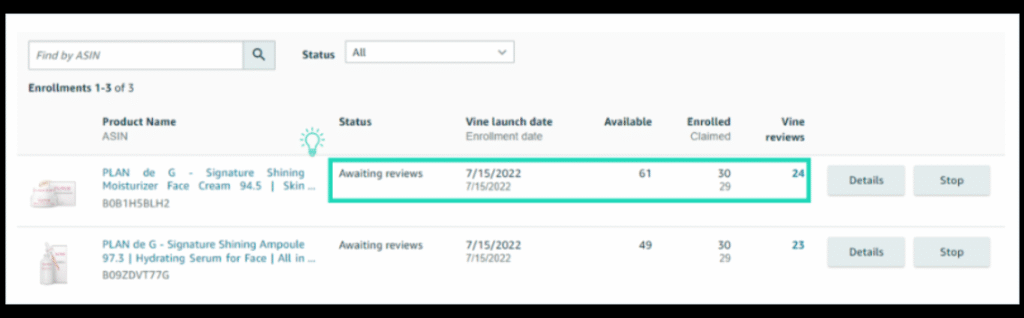
What to Look For?
Inside the Vine dashboard, Amazon displays a table of eligible products. This typically includes:
- Product image thumbnail
- ASIN
- Product title
- Current review count
- Enrollment status
- Available units
What to Do?
- Locate the ASIN you want to enroll.
- Confirm the review count is below 30.
- Verify the listing is active (not suppressed).
- Confirm FBA inventory is available.
If your ASIN does not appear:
- Double-check that it is FBA (not FBM).
- Confirm inventory is physically received (not just shipped).
- Verify review count is under threshold.
- Check for listing errors under “Manage Inventory.”
Only eligible ASINs will appear here.
Step 4: Select the Number of Units to Enroll
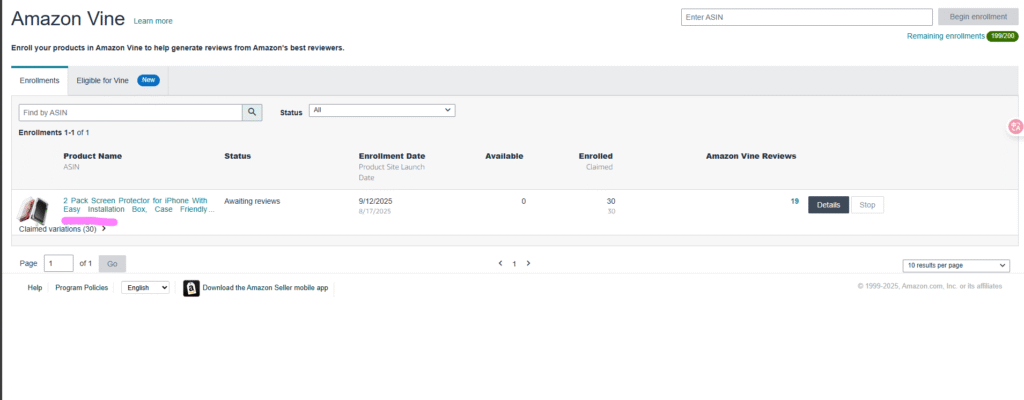
What to Do?
- Click Enroll next to your selected ASIN.
- Choose the number of units you want to make available (up to 30).
- Review the displayed enrollment fee tier.
Current structure (subject to change):
- 1–2 units: Free
- 3–10 units: $75
- 11–30 units: $200
Important:
- You are not charged until the first Vine review is published.
- The enrolled units will be reserved from your FBA inventory.
Choose carefully based on:
- Inventory level
- Launch strategy
- Budget
- Competition intensity
Step 5: Review and Confirm Enrollment
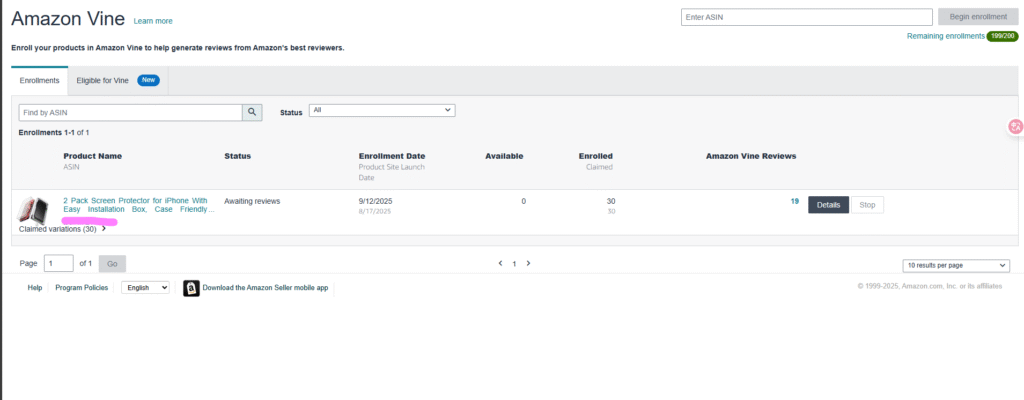
What to Do?
- Review the enrollment summary carefully.
- Confirm the ASIN and number of units.
- Click Submit or Confirm Enrollment.
After submission:
- Enrollment status changes to “Enrolled.”
- Units are reserved for Vine reviewers.
- The ASIN becomes visible in the Vine reviewer portal.
Approval is usually instant if eligibility conditions are met.
What Happens After Enrollment?
Once enrolled:
- Vine Voices can request your product.
- Units ship via FBA.
- Reviewers test and submit feedback.
- Reviews appear on your listing labeled as Vine reviews.
Typical timeline:
- 3–10 days for first claims
- 7–30 days for first reviews
- Full review cycle may take up to 6 weeks
You cannot contact reviewers or influence outcomes.
Tips Before Clicking “Enroll”
Before enrolling, confirm:
- Your listing images are optimized
- Your bullet points clearly set expectations
- Your product packaging is finalized
- Your price is competitive
- Your PPC campaigns are ready
Why?
Because the first reviews shape conversion rate and ranking trajectory. Vine accelerates visibility — good or bad.
Common Enrollment Issues and Fixes
ASIN Not Showing?
- Confirm review count
- Confirm FBA status
- Confirm Brand Registry
- Check account permissions
Enrollment Button Disabled?
- Inventory may not be available
- Listing may be suppressed
- ASIN may exceed review threshold
No Reviews After Enrollment?
- Category demand may be low
- Pricing may be too high
- Product appeal may be limited
Vine increases exposure — it does not guarantee demand.
Amazon Vine Cost
Current US pricing structure:
- 1–2 units: Free
- 3–10 units: $75
- 11–30 units: $200
Additional considerations:
- Cost of product units
- FBA fees
- Storage costs
If no review is posted within 90 days, no enrollment fee is charged.
Time It Takes to Get Reviews
Typical timeline:
- 3–10 days for product claim
- 7–30 days for review and posting
- 2–6 weeks total cycle
Categories with high demand move faster.
When Should Sellers Use Amazon Vine?
Vine is most effective when:
- Launching a new private-label product
- Entering a competitive niche
- Rebranding
- Relaunching suppressed ASINs
- Preparing for PPC scaling
Avoid using Vine if:
- Product defects exist
- Inventory levels are low
- Pricing is unstable
- Listing is poorly optimized
Amazon Vine Supports Product Launch Strategy
Vine impacts ranking indirectly by:
- Increasing review count
- Improving conversion rate
- Reducing buyer hesitation
- Strengthening listing credibility
However, Vine alone does not drive ranking.
It should work alongside:
- PPC launch campaigns
- Keyword indexing strategy
- Competitive pricing
- Inventory management
Common Mistakes Sellers Make With Vine
- Enrolling before listing optimization
- Ignoring pricing strategy
- Not coordinating with PPC
- Running out of inventory
- Failing to monitor early review feedback
These mistakes reduce ROI significantly.
How Amerify Integrates Vine Into a Structured Launch System?
At Amerify, we do not treat Amazon Vine as a standalone tactic.
Our process includes:
Pre-Launch Phase
- Keyword gap research
- Listing optimization
- Conversion modeling
Launch Phase
- Strategic Vine enrollment timing
- PPC structuring
- Budget allocation planning
Post-Launch Phase
- Ranking expansion
- Review sentiment monitoring
- Conversion optimization
This ensures Vine reviews contribute to measurable growth.
FAQ
Does Vine Guarantee Positive Reviews?
No.
Vine reviews are:
- Honest
- Independent
- Non-editable
- Public
You cannot influence reviewer ratings.
This is why listing optimization and product quality matter before enrollment.
Can I apply to become a Vine reviewer?
No. There is no public application process to join Vine as a reviewer.
Amazon selects Vine Voices directly based on review quality, helpful votes, consistency, and account standing. Invitations are sent through the customer’s Amazon account.
To increase your chances, focus on writing detailed, balanced, and helpful reviews over time. However, there is no guaranteed pathway or timeline for selection.
Can any seller use Vine?
No. Only eligible sellers can enroll products in Amazon Vine.
To qualify, you must:
- Have a Professional seller account
- Be enrolled in Brand Registry
- Use FBA for the product
- Have fewer than 30 reviews on the ASIN
- Maintain a complete, active listing
How many reviews can I expect?
Sellers can enroll up to 30 units per ASIN, but that does not guarantee 30 reviews.
The final number depends on how many Vine reviewers claim the product and complete their reviews. Most sellers receive several reviews within the first few weeks, while full participation can take up to 4–6 weeks.
Vine increases the opportunity for early reviews — it does not guarantee maximum review volume.
Is Amazon Vine worth it?
For new product launches, Vine can help accelerate early credibility and improve conversion rates.
Listings with zero reviews often struggle to convert traffic. Vine helps establish initial social proof, which can support PPC efficiency and organic ranking growth.
However, results depend on product quality, pricing, and overall launch strategy. Vine works best when used as part of a structured launch plan — not as a standalone tactic.
Can I remove negative Vine reviews?
No. Vine reviews cannot be removed simply because they are negative.
They follow the same review policies as standard customer reviews. Sellers cannot contact Vine reviewers or request rating changes.
This is why product readiness and listing accuracy are critical before enrolling in the program.
Final Thoughts
Amazon Vine can give sellers early reviews and credibility — but only if it’s used strategically. It works best when your listing, pricing, and launch plan are fully optimized. For individuals, Vine as a reviewer is invitation-only and requires consistent, high-quality reviews over time.
For sellers ready to accelerate a product launch, Vine is a tool — not a shortcut. Used correctly, it can boost conversion, build trust, and support long-term growth.
Contact us today and see how Vine can fit into your Amazon launch strategy.